2 min read
PhD Students: Use Styles
By Tak Tsun (Edmund) Lo — psychologist and researcher (NL/HK). Get in touch.
If there is only one piece of advice I can give to PhD students, I would say: Use styles!
I am not referring to writing styles (though it doesn’t hurt to have those). I am referring to a very basic but often neglected function in Word: Styles.
Never, ever do any formatting in Word one place at a time (e.g., applying bold and center for “Abstract”). Always define your styles and apply them repeatedly throughout your documents.
The good thing is not just consistency. It is also what happens when you have multiple documents that you need to pool together into a Word document that runs 300+ pages (i.e., your dissertation). Without Styles, you need to crawl through all those pages to check whether you have applied the right formatting to the level-X subheading. With Styles, you can finish formatting in a whoosh using actual styles.
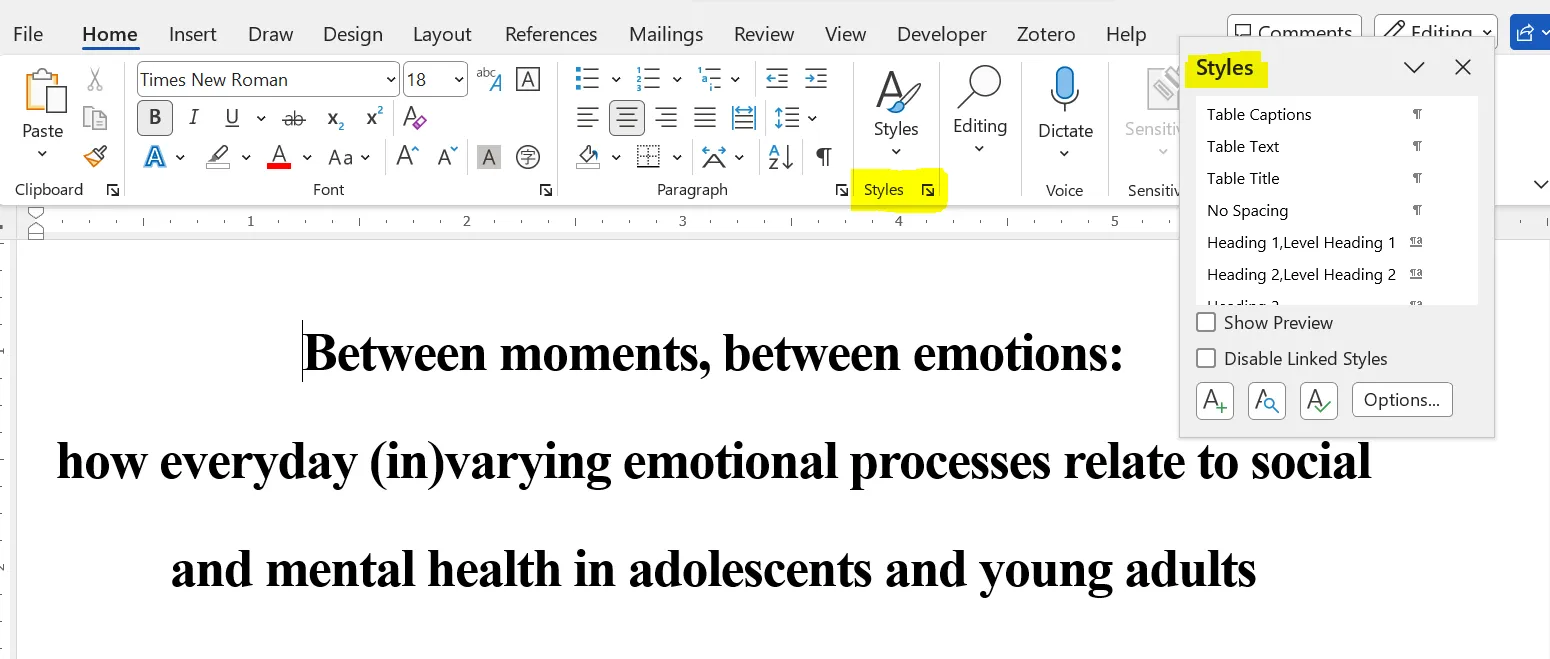
How exactly do you activate that? Simply click that little “more options” icon under the Styles section in the Home tab. (Yes, Microsoft Office is obnoxious for hiding most of the useful functions in the most inconspicuous places.) Voilà! You now have a panel where you can inspect, create, apply, and modify styles.
Dissertation printing companies in the Netherlands often require specific font sizes for different elements in the document. For example, the company I am working with is requesting very specific font sizes for the title (size 30), level-1 heading (size 18), table text (size 10), and so on.
Luckily, I have used Styles, so amending these was not too painful. It would be a nightmare to go through this exercise page by page!
So… forget about the APA 7 style or whatever citation styles you are working with (that can be elegantly solved by Zotero, by the way). For now, the one piece of advice you can use from the beginning to the end of your PhD is this: Use Styles!
Related posts: PhD thesis: Between moments, between emotions · Defending a PhD in 100 days